Where the waiting goes
By Nacho Viejo · Originally published on saski.com
Web edition updated

I’ve been working on Agent Systems Lab, following some of the questions that came out of reading Donella Meadows’ Thinking in Systems. It’s a small playground for experimenting with agent workflows. This time, I wanted to look at what happens when execution gets faster while review capacity stays the same.
For me, Alfredo Artiles’ work brings together plenty of good reasons to read Meadows’ book. His Systems Thinking for Developers Workshop connects systems thinking with software development, and points back to “Martillos y clavos”, his talk at Pamplona Software Crafters in 2023. The Dev Systems Wiki contains more examples. I’d recommend these resources especially now that so many of us are building systems of agents: the feedback loops, delays and effects of changing one part of a system are things we need to understand in our own work.
The previous experiment gave me the numbers. From there, I wanted to follow a task through the system and see where it spent its time waiting. So I added a replay to the local dashboard.
For the simulation, I used 24 tasks and one simulated reviewer. A new task arrives every two ticks. Each takes eight ticks of execution and six ticks of review; these are units of model time, with no measured conversion to seconds.
I tracked each task until the reviewer made a decision on the proposed change. That includes waiting before execution and waiting after the automated work has finished.
I compared three versions:
- A has one execution slot, so one task can execute at a time.
- B has four execution slots, allowing up to four tasks to execute at once.
- C has the same four slots, but at most three tasks can be between starting execution and receiving a decision.
That last rule is the work-in-progress (WIP) limit. Executing tasks, tasks waiting for review and the task being reviewed all use one of those places. A place becomes free when a decision is made. Anything waiting to start stays visible and still counts as unfinished work.
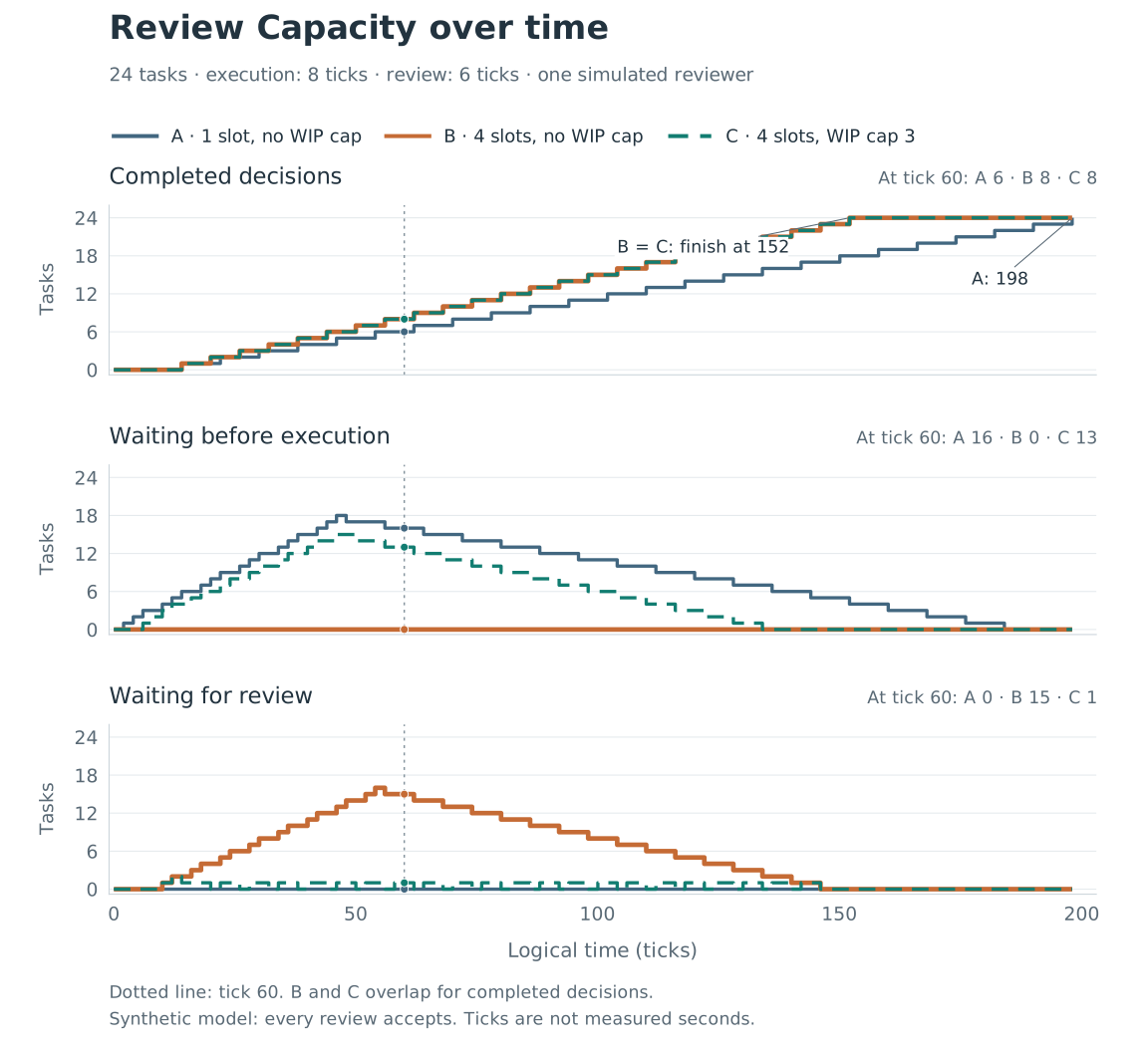
At tick 60, that limit brings the review queue down from 15 tasks in B to one in C. Both have completed eight decisions and still have 16 unfinished tasks. In C, 13 of them are waiting to start; one is executing, one is waiting for review, and one is being reviewed.
Task #11 from the saved trace makes that change easier to follow. It arrives at tick 22 in all three versions. In B, it starts straight away and then waits 44 ticks for review. In C, it waits 40 ticks before execution and four for review. Both receive a decision at tick 80.
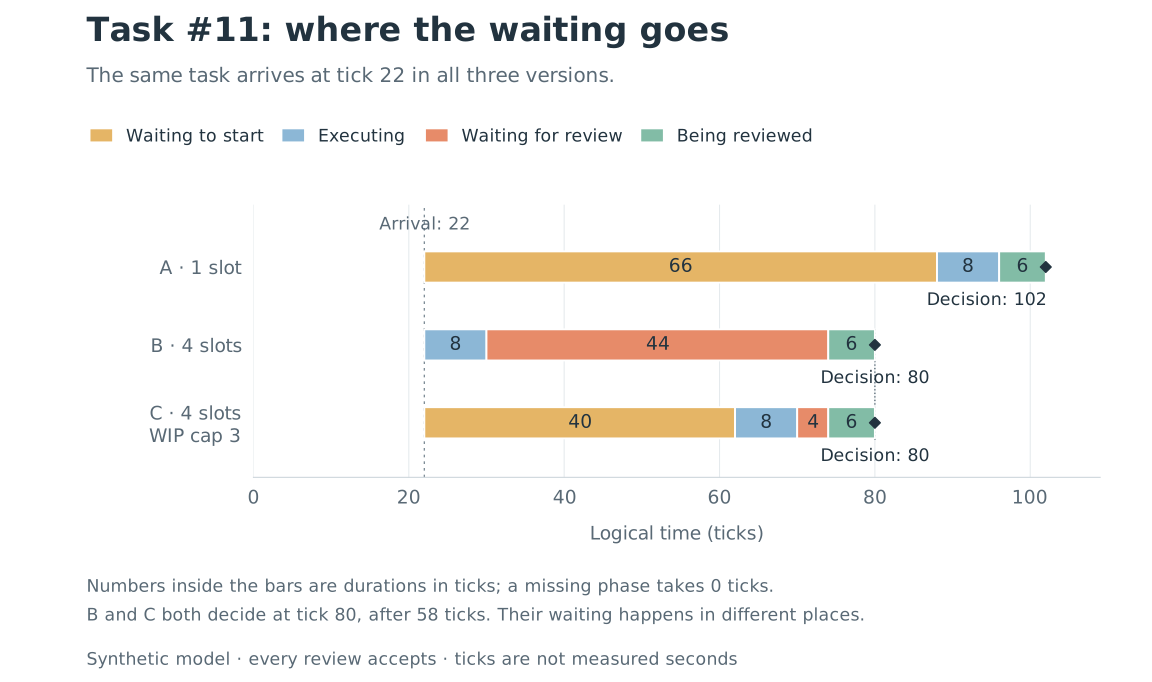
That timing holds for every task in this particular scenario: B and C finish each task at the same tick, with the cap changing how much work has started and where it waits.
The new Experiments view brings the comparison, charts and individual task positions together. Select policy B at tick 60 and you can see the work waiting for review. Switch to C at the same tick and most of that waiting is before execution. You can go backwards through the replay to follow how each task got there, connecting the totals with the individual tasks behind them.
Play/Pause and the speed controls move through the saved trace. They affect how quickly you watch it; execution and review capacity stay the same. The dashboard guide covers local setup and how to read the different views. The scenario file contains the inputs used here.
The reviewer in this example accepts every task. There are no mistakes, requests for changes, interruptions or fatigue. A smaller review queue here says nothing about review quality or the productivity of a real team.
The next experiment will test the admission rule with actual fixture workflows: whether a task waiting for a human decision keeps its place, including after a restart. That behavior still needs implementing and testing.